
Create Flythrough Videos with AI
Turn static 3D renders into a seamless cinematic walkthrough of your entire project — in minutes.
Vibe3D’s AI-powered flythrough video generator transforms your renders into smooth, cinematic architectural videos. Simply select your renders, choose from preset camera paths, and generate a presentation-ready, photorealistic video — no keyframing or manual video editing required.
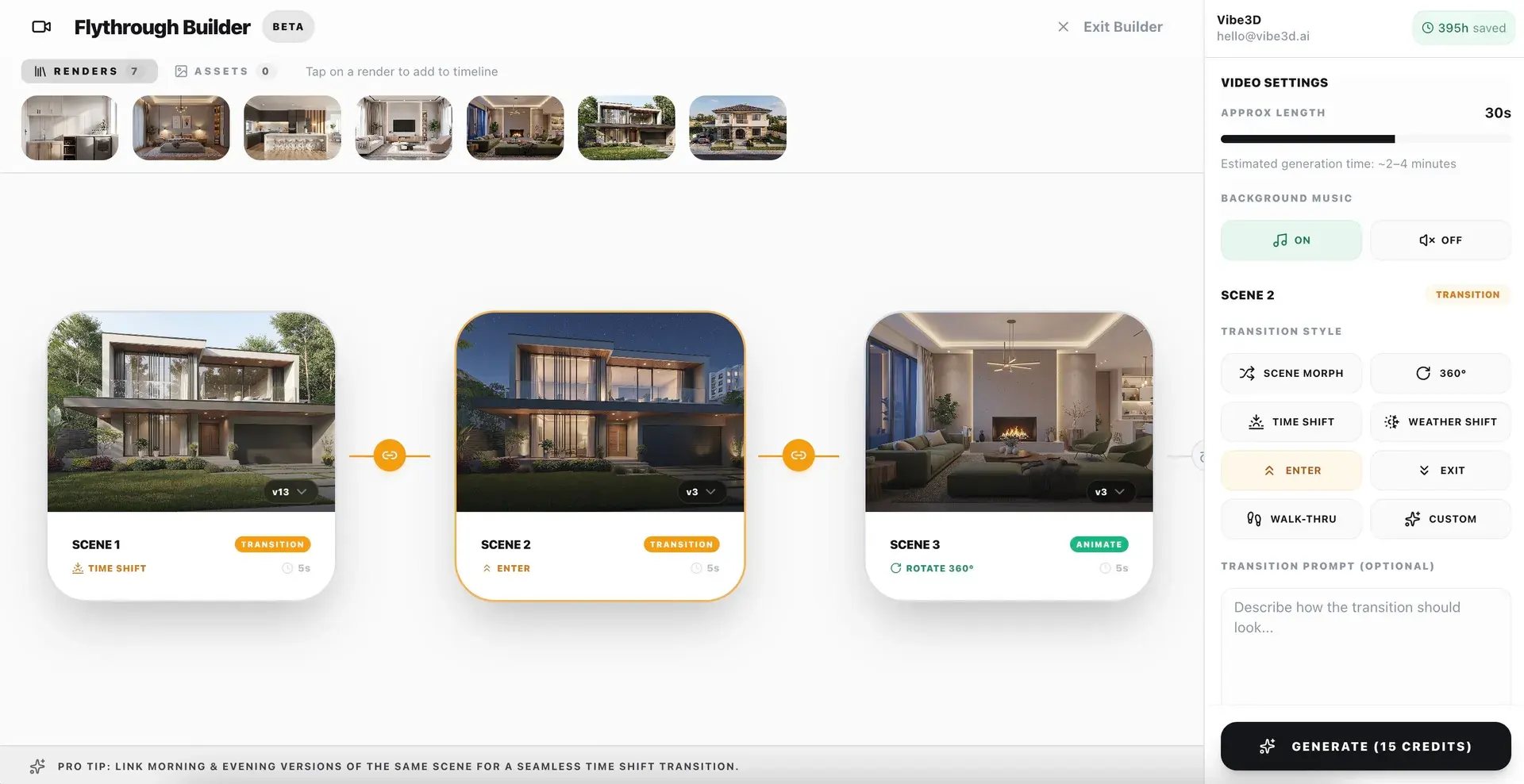
From Renders to 3D Flythrough Video in three steps
Select your renders
Choose the best renders from your project to include in the flythrough sequence.
Set path & style
Pick camera movements and transitions for smooth, cinematic motion across scenes.
Generate & export
The flythrough AI assembles your final video with motion and music — ready to download.
What makes our 3D Flythrough Builder powerful?
Preset Camera Paths
Smooth, cinematic camera moves — dolly zooms, pan, walkthroughs, drone pullbacks, and 360° orbits.
Photoreal Every Frame
Every frame of your 3D flythrough is rendered with high-fidelity realism, so the whole video looks cinematic.
Auto-matched Music
Background music is picked from our curated library of cinematic tracks and auto-matched to your video's length.
Ready to Share
Export MP4s sized for client presentations, websites, and social media in one step.


Common questions on Flythrough Videos
What is a 3D flythrough video?
A 3D flythrough is a moving camera video that travels through an architectural scene, giving viewers a cinematic walkthrough of a space or building. Vibe3D's flythrough AI generates these videos directly from your static 3D renders — with smooth camera paths and transitions — so you don't need any 3D animation or video editing software.
How long does it take to generate a flythrough video?
A 30-second flythrough video at 1080p typically takes around 3–4 minutes to generate, depending on scene complexity. The flythrough AI handles camera motion, frame rendering, and transitions for you.
Can I customise the camera path for my walkthrough?
Yes. Choose from preset cinematic paths — zoom, pan, 360° rotate, drone pullback, fly over — or define custom movements for each scene to control exactly how your project is revealed.
What video lengths and aspect ratios are supported?
You can create flythrough videos up to around 75 seconds long with up to 15 scenes. Vibe3D automatically selects the aspect ratio best suited to your input renders, with exports ready for client presentations, portfolios, or social platforms.
Can I add music to my 3D flythrough?
Yes. Vibe3D can automatically add background music from a curated cinematic library, matched to your video's duration — no external editing tools required.
What formats can I export?
Flythrough videos export as MP4, making them easy to drop into presentations, embed on websites, or post to social media.